
 Gwisted
Community
New TeyvatGPS Extension Allows In-Game Map Control
Gwisted /
A community developer released a new Chrome and Edge extension for TeyvatGPS, enabling players to manage map features and manually mark items as collected without alt-tabbing.
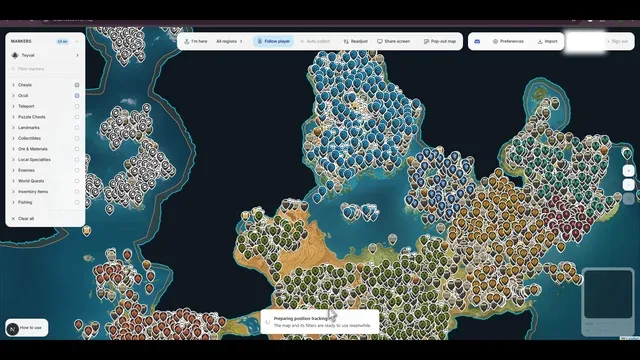
At a glance
- New Chrome/Edge extension for TeyvatGPS enables in-game map control.
- Tool reads the minimap to show real-time player position.
- Manual collection shortcut replaces error-prone auto-collect feature.
- Popout mode allows map visibility without alt-tabbing.
A community member has released a new browser extension for TeyvatGPS, a popular interactive map tool for Genshin Impact. The extension is available for Chrome and Edge and allows players to control specific map features directly while playing the game. By sharing the game screen, the tool reads the in-game minimap to display the player's real-time position on the TeyvatGPS interface. This functionality supports a popout version, keeping the map visible without requiring constant alt-tabbing.
The primary motivation for this update is to improve manual collection tracking. While TeyvatGPS previously offered an auto-collect feature, the developer noted that it could incorrectly mark chests as collected if the player merely walked past them. The new extension replaces this with a manual shortcut system. Players can now assign a keyboard shortcut to mark the nearest marker as collected instantly, eliminating the need to leave the game client. This update provides greater precision for players tracking resources and chests, offering a more reliable alternative to automated tracking methods. The tool remains a community-driven project, designed to enhance the mapping experience through direct user control.