
 Gwisted
Community
Wuthering Waves Update Forces Launcher Use, Breaking Direct Executable Launches
Gwisted /
A recent Wuthering Waves update prevents players from launching the game directly via executable shortcuts, causing immediate crashes. Community members have identified a workaround using specific command-line arguments.
At a glance
- Recent Wuthering Waves update causes immediate crashes when launching via direct executable shortcuts.
- The game launcher is now required for startup, removing the previous option to bypass it.
- Community member Aymasta provided a workaround using command-line arguments like `-krqlv=sd`.
- The issue was reported by u/Spanksh on r/WutheringWaves.
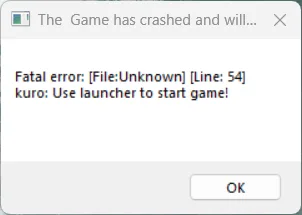
Players of Wuthering Waves have reported that a recent update has broken the ability to launch the game directly through executable file shortcuts. Previously, users could bypass the game launcher entirely, using it only for necessary version updates. However, following today's patch, attempting to start the game this way results in an immediate crash with an error message.
This change has frustrated the community, as the launcher was often considered an unnecessary step for daily play. Fortunately, a solution was quickly identified by community member Aymasta. The fix involves adding specific command-line arguments to the game shortcut to restore direct launching functionality.
Depending on individual system settings, users can append one of the following arguments to their shortcut: `-krqlv=sd`, `-krqlv=hd`, or `-krqlv=uhd`. This workaround allows the game to start without the launcher, effectively reverting to the previous behavior. The issue was highlighted in a post by u/Spanksh on r/WutheringWaves, where the community shared the error details and the subsequent fix. While the developer has not yet commented on this specific change, the community workaround provides a temporary remedy for those who prefer skipping the launcher interface.